With the Gmail addon installed, you are able to easily store contacts and mails from Gmail into Atlas CRM. Besides storing mails there are more reasons to use this app. Here is an overview of what is possible:
Search for Atlas CRM contacts in Gmail
While in Gmail, you can search for your Atlas CRM contacts to quickly send them an email.

Add contacts to Atlas CRM based on a message in Gmail
When viewing a message in Gmail, you can view which Atlas CRM contacts are present in the conversation. Participants that do not exist in Atlas CRM yet can be added easily.

View information about the people who are contacting you
Important information you have about the people who are contacting you is available right next to your message in Gmail.

Store conversations in Atlas CRM
Add conversations in Gmail to the interactions overview in Atlas CRM. When you store a conversation, all future replies in this conversation will automatically be added to Atlas CRM as well. This will enrich your CRM automatically allowing your teammates to read along with the conversations that you are having.


Automatically store conversations for a specific contact
You can choose to store all future conversations that you have with a specific contact. Any new thread in Gmail will automatically be stored in Atlas CRM from that point. You can do this by activating this option on the contact's detail page in Gmail.

Manage your storing settings in Atlas CRM
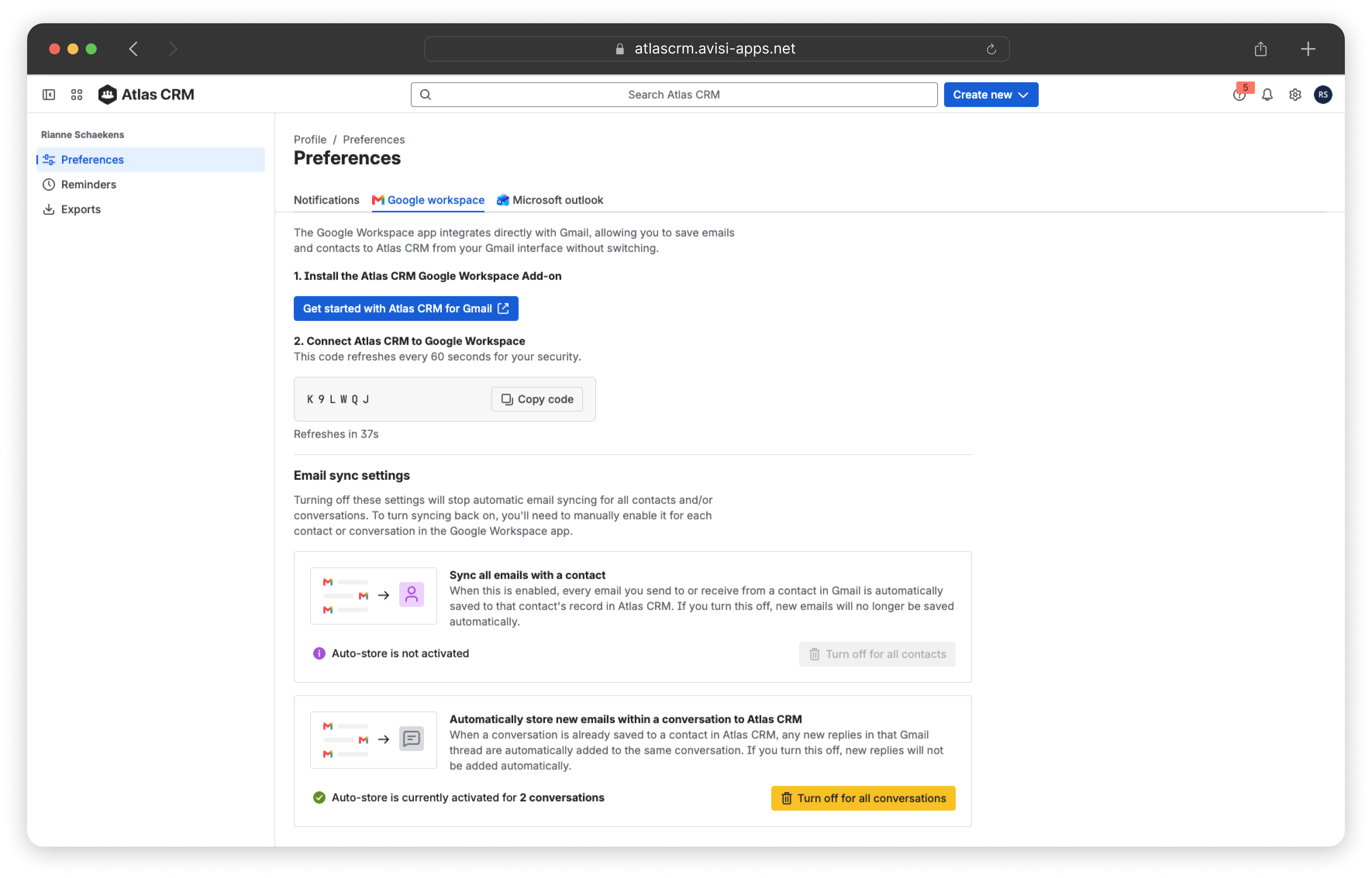
To see and manage which emails are stored automatically, click your profile picture in the top-right corner, select Preferences and go to the Google Workspace tab. Under Email sync settings, you see:
-
Sync all emails with a contact: for how many contacts all emails are stored automatically.
-
Automatically store new emails within a conversation: for how many conversations new replies are stored automatically.
To stop automatic storing, click Turn off for all contacts or Turn off for all conversations.
Important: This turns off automatic storing for all contacts or conversations at once. To turn it back on, you have to enable it again for each contact or conversation in the add-on.